
Hello everyone! Today, we'll explore how to use regular expressions (RegEx) in Oracle Analytics Cloud (OAC) to standardize different date formats into a single format. This process is incredibly useful for data preprocessing and can significantly improve the accuracy of your analyses by ensuring consistent date formats.
1. Introduction to the Problem
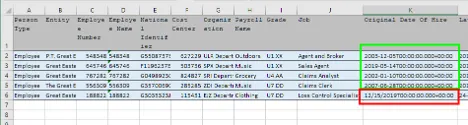
Sometimes, we encounter datasets where a single column contains dates in various formats. For example:
Show Image
As you can see in the image above, we have different formats like '2007-06-28T00:00:00.000+00:00' and '12/15/2019T00:00:00.000+00:00'. Our goal is to unify these into a single, consistent format.
2. Loading the Dataset into OAC
First, import this dataset into OAC. The data loading process follows the standard OAC data addition procedure.
3. Changing Date Format using RegEx
Once the dataset is loaded, follow these steps to change the date format:
1.
In the 'Prepare' section, select the 'Original Date Of Hire' column.
2.
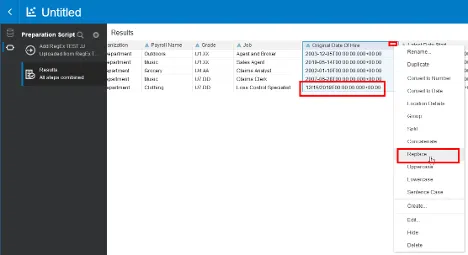
Click the hamburger menu (three dots) and select 'Replace'.
3.
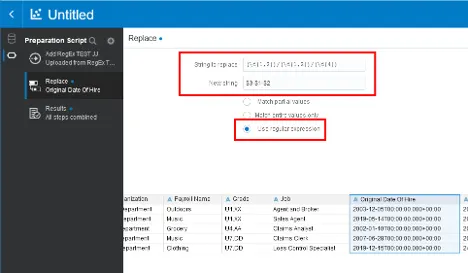
In the 'Replace' dialog box, select the "Use regular expression" option.
4.
Enter appropriate regular expressions in the "String to replace" and "New string" fields.
5.
Click the "Add Step" button to apply the changes.

6.
Verify the applied script.

4. Converting to Date Type
Now, we need to convert the text-format dates to actual date types:
1.
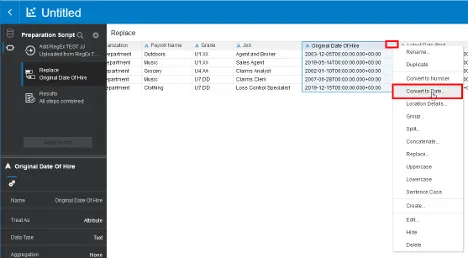
Select the modified column and choose the "Convert to Date" option.
5. Applying Custom Date Format
After converting to date type, we can customize the format as desired:
1.
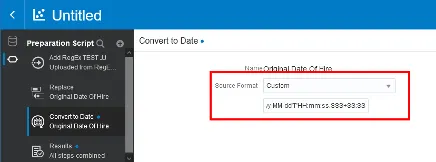
Select the date column and choose the "Custom" format.
2.
Enter the following custom format: yyyy-MM-dd'T'HH:mm:ss.SSS+SS:SS
3.
Click the "Add Step" button to apply the changes.

4.
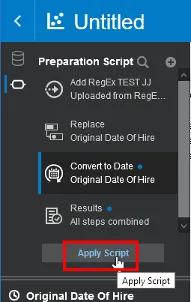
Verify the applied script.
6. Final Verification
After completing all steps, review your dataset to ensure all dates have been unified to the desired format.
Conclusion
We've now learned how to use regular expressions in Oracle Analytics Cloud to standardize different date formats into a single format. This technique is extremely valuable in the data preprocessing stage, allowing for more accurate and reliable analyses through consistent date formatting.
By combining the power of regular expressions with OAC's flexible data handling capabilities, you can efficiently perform complex data cleansing tasks. We hope this guide proves helpful in your data analysis endeavors!
If you have any questions or need further assistance, please don't hesitate to ask. Good luck with your data preprocessing and analysis!