
Hello everyone! Today, we're diving into one of the crucial security features of WebLogic Server: Configuration Audit. This feature allows us to track system changes made by administrators and enhance overall security.
What is Configuration Audit?
Configuration Audit is a feature that generates log messages and audit events when there are resource configuration changes or management operations performed within a WebLogic Server domain. For instance, if an administrator disables SSL on a Managed Server, this event is recorded.
Why is Configuration Audit Important?
1.
Enhanced Security: Track who made what changes and when
2.
Compliance: Provides audit trails required by many industry standards and regulations
3.
Troubleshooting: Helps identify the cause of issues arising from system changes
Checking if Configuration Audit is Enabled
1.
Log in to the WebLogic Server Admin Console
2.
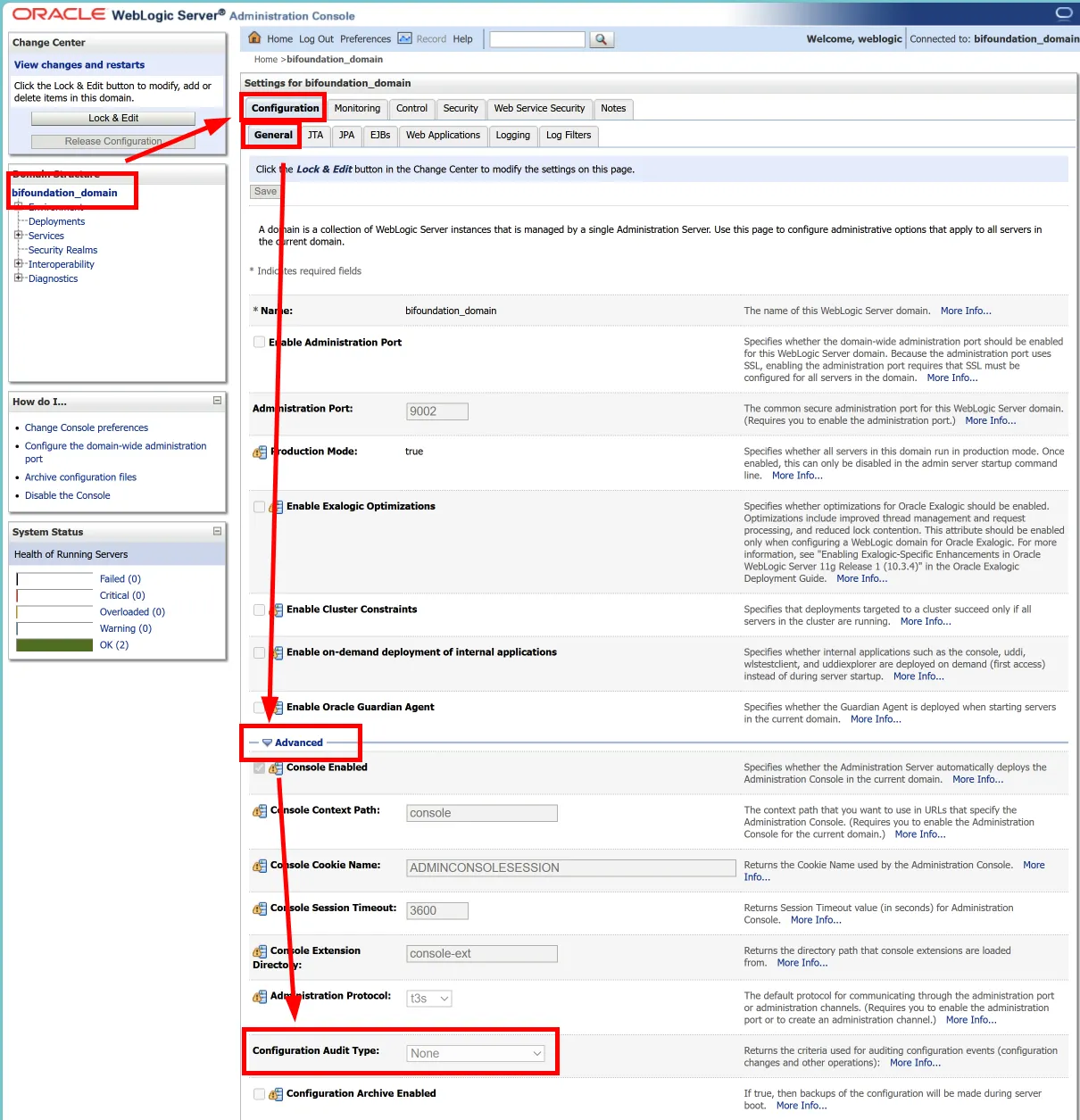
Click on the domain name in the left navigation pane
3.
Select "Configuration" > "General" tab
4.
Expand the "Advanced" options
5.
Check the "Configuration Audit Type" setting
•
If it's not set to "None", it's enabled
How to Enable Configuration Audit
1.
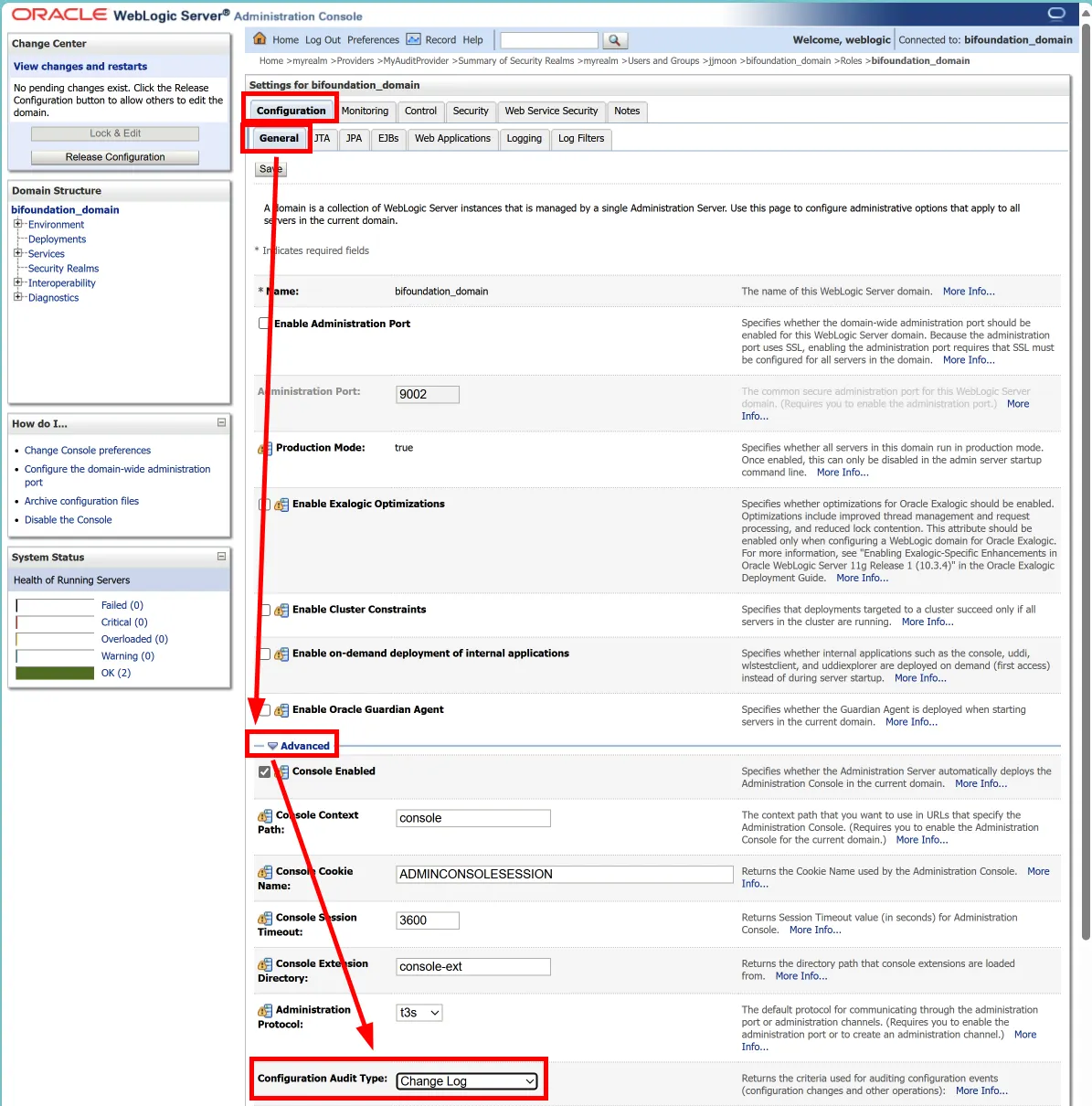
Follow the steps above to reach the "Configuration Audit Type" setting
2.
Choose from these options:
•
"log": Records only in the Admin Server log file
•
"audit": Generates only audit events
•
"logaudit": Records in the log file and generates audit events
3.
Save changes and restart the server
Analyzing Audit Logs
When Configuration Audit is enabled, entries in the AdminServer.log file will look like this:
<Sep 16, 2024 9:54:38 PM EDT> <Info> <Configuration Audit> <demo> <AdminServer> <[ACTIVE] ExecuteThread: '0' for queue: 'weblogic.kernel.Default (self-tuning)'> <weblogic> <> <847824da0ddfac2d:-31460bea:191fda23576:-8000-000000000000003e> <1726538078198> <BEA-159907> <USER weblogic INVOKED ON Security:Name=myrealmDefaultAuthenticator METHOD removeMemberFromGroup PARAMS BIAdministrators; jjmoon>
Plain Text
복사
This log shows that user 'jjmoon' was removed from the 'BIAdministrators' group by “weblogic” user.
Automating Log Analysis
To efficiently analyze large log files, you can use a bash script. Here's an example script and how to use it:
#!/bin/bash
# Set the directory where the log files are located
LOG_DIR="/app/oracle/biee/user_projects/domains/bifoundation_domain/servers/AdminServer/logs"
# File to save the results
OUTPUT_FILE="group_membership_changes.txt"
# Initialize the result file
> "$OUTPUT_FILE"
# Find and process AdminServer log files
find "$LOG_DIR" -name "AdminServer*.log" | sort | while read -r log_file; do
echo "Processing file: $log_file" >> "$OUTPUT_FILE"
echo "----------------------------------------" >> "$OUTPUT_FILE"
# Search for removeMemberFromGroup and addMemberToGroup events in the log file
grep -E "removeMemberFromGroup|addMemberToGroup" "$log_file" | while read -r line; do
# Extract timestamp
timestamp=$(echo "$line" | grep -oP '(?<=<)[^>]*(?=>)')
# Extract user and action information
user_action=$(echo "$line" | grep -oP '(?<=<BEA-159907> <USER ).*(?=>)')
# Determine the type of group membership change
if [[ $line == *"removeMemberFromGroup"* ]]; then
action_type="Removed from"
elif [[ $line == *"addMemberToGroup"* ]]; then
action_type="Added to"
fi
# Output the results
echo "Time: $timestamp" >> "$OUTPUT_FILE"
echo "Action: $action_type group" >> "$OUTPUT_FILE"
echo "Details: $user_action" >> "$OUTPUT_FILE"
echo "---" >> "$OUTPUT_FILE"
done
echo "" >> "$OUTPUT_FILE"
done
echo "Results have been saved to $OUTPUT_FILE."
Bash
복사
Key Features of the Script:
1.
The LOG_DIR variable sets the directory path where log files are located. (Modify "/app/oracle/biee/user_projects/domains/bifoundation_domain/servers/AdminServer/logs" to match your environment)
2.
Results are saved in the group_membership_changes.txt file.
3.
The find command is used to locate all log files matching the AdminServer*.log pattern.
4.
Found files are sorted and processed in order.
5.
For each file:
•
The file name is recorded in the results file.
•
Configuration Audit information is extracted and recorded in the results file.
6.
Upon completion, the script indicates the location of the results file.
How to Use:
1.
Create the script file (e.g., audit_script.sh) and grant execution permissions (chmod +x audit_script.sh).
2.
Modify the LOG_DIR variable to point to the actual directory containing your log files.
3.
Run the script: ./audit_script.sh
This script processes all AdminServer log files and consolidates the Configuration Audit information found in each file into a single, easy-to-read results file.
Benefits:
•
Time-saving: Automates the process of searching through multiple log files.
•
Comprehensive: Captures all relevant audit information across multiple log files.
•
Organized Output: Presents the audit information in a clear, readable format.
By using this script, administrators can quickly get an overview of all configuration changes and group membership modifications across their WebLogic Server environment. This is particularly useful for regular security audits or when investigating specific system changes.
Remember to adjust the script as needed to fit your specific environment and requirements. You might want to add additional filtering or search criteria depending on what specific audit information you're most interested in tracking.
Important Considerations
1.
If using external authentication providers (e.g., Oracle Internet Directory), WebLogic Configuration Audit doesn't monitor direct changes to that LDAP.
2.
Enabling auditing may slightly impact system performance, so adjust the configuration as needed.
Conclusion
The Configuration Audit feature in WebLogic Server, combined with automated log analysis tools like the script we've discussed, provides a powerful means of tracking system changes and enhancing security. By leveraging these tools, you can increase transparency in system administration, quickly identify unauthorized changes, and maintain a comprehensive audit trail for compliance and troubleshooting purposes.
If you have any questions about implementing this script or need help customizing it for your specific needs, feel free to ask in the comments!